


WinStamp Business
3.75.00 Reviews
App Specs
- Version
- 4.5.5
- Updated On
- License
- Free
- Downloads
- 50,000+
- Developer
- WinStamp Oy
- Categories
- Shopping
- Platform
- Android
Screenshots
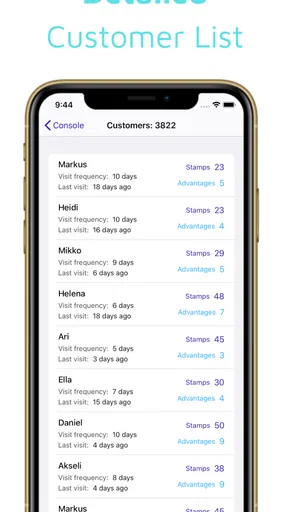
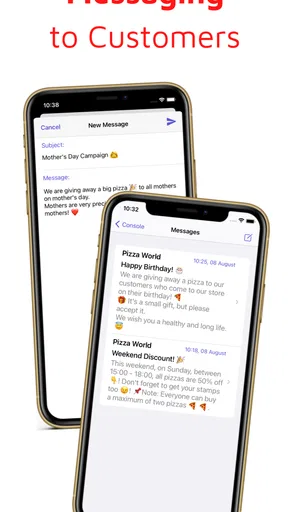
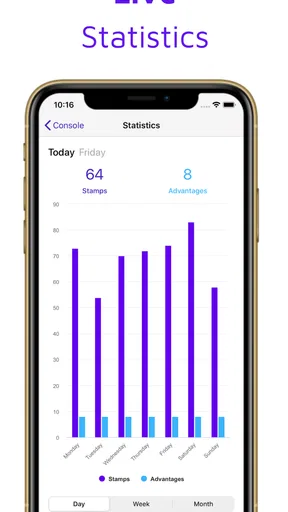
 Analysis by AppCompare
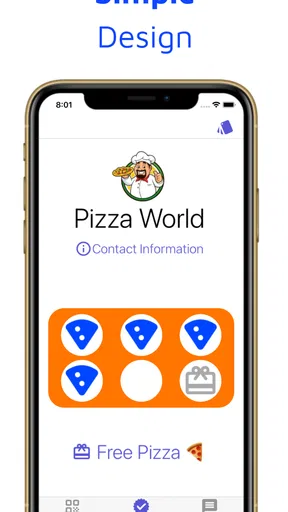
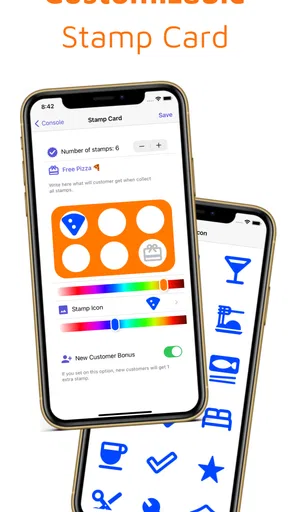
I approach WinStamp Business with a different expectation than I would a full office suite. It is a free shopping app from WinStamp Oy, and its focus is digital customer loyalty: helping participating businesses run stamp-based rewards on a phone. That makes the central question less about invoices or project management and more practical: will a digital loyalty routine be easier for a customer and a shop than keeping track of paper cards?
That distinction matters before you install it. A loyalty app is useful only when the businesses you visit actually use it, and when you can bring it up at the right moment. I would treat it as a companion to participating shops, not as a universal wallet for every rewards program. If you mainly want an all-purpose business organizer, the product described here is not the right fit; if you want a digital way to engage with participating loyalty schemes, it is much closer to the mark.
Where a connection becomes part of the routine
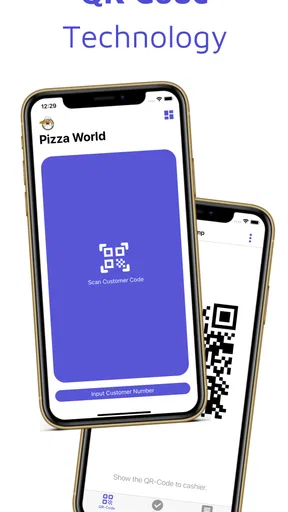
Digital loyalty has a small but important timing challenge: the app needs to be ready when you are paying or checking whether a reward is available. In a calm moment at home, that is easy. In a busy queue, with a cashier waiting and other people behind you, even a brief delay can make a digital stamp feel less convenient than a paper card. I would open the app before reaching the counter rather than assume I can sort it out while paying.
That is also why I would not rely on it as the only way to remember a reward. A practical habit is to check the app after a visit, while you still remember what you bought, and make sure the loyalty activity appears as expected. It turns a vague “I think I got a stamp” into a quick check. If the shop’s process requires a particular step at checkout, asking the staff before you pay is sensible; it avoids trying to resolve a missed step after leaving.
The app’s average rating is 3.7 from around 218 ratings, a mixed signal rather than a reason by itself to dismiss it. I read that as a reminder to keep expectations grounded: a loyalty tool can be convenient, but the day-to-day experience depends on the participating business and the moment you use it. Its 50,000-plus installs suggest it has found an audience, though that alone does not tell me whether it covers the shops you personally visit.
How it fits real mobile situations
The best use case is not complicated. Imagine stopping at a café you visit regularly on the way to work. Instead of carrying another card or trying to remember where you put one, you bring up the digital loyalty option during the visit. Later, when you are waiting for a bus, you can check whether the visit has been recorded before deciding whether to return for another purchase. That is a small convenience, but it is exactly the kind that can make a loyalty system easier to keep using.
For a small business, the appeal is different: a digital program can give customers a reason to come back without asking them to keep a paper card in a wallet. But the app only helps if the business and its customers both adopt the process. I would ask a shop how customers are meant to use its program before building a routine around it; a reward system that staff rarely recognize is more frustrating than a simple card kept near the till.
Worth Reading Before You Choose

Flipboard Shows What News Apps Must Do Beyond the Feed

Switching to Android Auto Means Rethinking Your Driving Routine

Google Calendar Makes a Crowded Week Easier to Manage

Ludo King Makes the Most of the Minutes Between Plans

Baby Panda World Brings Quick Play to Modern Phones, but Its Game Library Feels Busy

ESPN’s Live Game View Makes Following Close Games Easier
On a phone, attention and battery are limited, so I would avoid treating every loyalty scheme as something that deserves a permanent place in my daily workflow. The useful test is whether a program gives you a clear, realistic benefit at places you already visit. If it does, a digital record can reduce wallet clutter. If it encourages extra trips or purchases just to chase a reward, the convenience is not necessarily worth it.
What to do when the moment goes wrong
Connectivity is part of the experience to consider, but I would not assume the app can complete every step without a working connection. If a screen takes too long to load at checkout, first avoid blocking the line: let the staff know you are having trouble, finish the purchase in the way the shop allows, and check the app again afterward. If the visit is still missing, ask the business how it handles that situation rather than assuming a stamp can be added later.
A little preparation can prevent most awkward moments. Before visiting a participating shop, open the app somewhere with a reliable connection and make sure you know where the relevant loyalty information is. If you are heading into a place with poor reception, do not count on being able to set up or retrieve a program for the first time at the counter. This is not a claim that the app has a particular offline mode; it is simply a sensible way to avoid making a purchase depend on a screen that has not loaded.
For a recurring problem, note which shop and what stage of the process failed, then ask the business or the app’s support channel for the correct next step. That is more useful than repeatedly tapping or making a second purchase in the hope that the reward will appear. Digital loyalty is supposed to make repeat visits simpler, so a shop that cannot explain how to recover from a missed transaction may not be a good program to depend on.
Keeping the habit light and worthwhile
Because this is a shopping app built around digital customer loyalty, I would use it selectively rather than expecting it to replace every card, coupon, or retailer account. Paper cards remain straightforward when you only use one local program and want something that works without opening an app. A retailer’s own app may be better when you need that retailer’s broader shopping tools. WinStamp Business makes more sense when the participating business’s loyalty process is the thing you want to use.
One useful way to keep it manageable is to review your routine after a few visits. Are you remembering to present the app naturally? Does the reward feel attainable through purchases you would make anyway? Is the process clear to the staff? Those questions help distinguish a genuinely useful loyalty program from one that adds another task to checkout. I would also avoid entering the app while distracted near traffic or while carrying bags; checking it before you reach the counter is both calmer and more considerate of people waiting.
For data-conscious use, I would keep the app’s role narrow: use it for the loyalty activity you actually want, and take a moment to read the current app permissions and privacy details on your device before deciding what to share. I would not infer a particular privacy policy or security feature from the app’s purpose alone. That small check is worthwhile for any shopping app, especially if you prefer to keep retailer activity separate from other parts of your digital life.
Who should try it—and who may prefer another option
I can see WinStamp Business suiting someone who visits participating businesses regularly and wants to handle loyalty digitally rather than keep track of separate paper cards. It may also appeal to a local business exploring a digital customer-reward routine, provided the staff can explain the process clearly and customers are willing to use it. The app is free to download, rated for Everyone, and its current version is 4.4.20, with Android 7.0 as the minimum operating-system requirement. There are in-app purchases listed at $9.99 to $29.99 per item, so I would check what a purchase applies to before spending; the basic download being free does not mean every optional item is free.
I would skip it if the shops I visit do not participate, if I rarely use loyalty programs, or if I want a general-purpose business manager. I would also prefer a paper card when a program is used only occasionally and I do not want another app in my checkout routine. A retailer-specific app can be the better choice when it provides useful store functions beyond rewards. The right comparison is not “digital is always better,” but whether this particular program saves enough effort to justify keeping it ready on your phone.
Your Business, Simplified
First off, WinStamp Business is incredibly user-friendly. The interface is sleek and intuitive, which means you won't need a tech degree to navigate through it. It's designed to make your life easier, not harder. From scheduling meetings to managing invoices, everything is just a tap away. It’s like having a Swiss army knife for your business tasks.
Features that Stand Out
One of the things I love about this app is its comprehensive set of features. Let’s break down some of the standouts:
- Task Management: You can create, edit, and track tasks with deadlines. It’s perfect for keeping your team on the same page.
- Invoices and Billing: Generating invoices is a breeze. The app allows you to customize them with your logo and send them directly to clients.
- Collaboration Tools: With integrated chat and file sharing, working with your team remotely feels seamless.
- Analytics: Get insights into your business performance with easy-to-read reports and charts. It's data-driven decision-making at its best.
Efficiency on the Go
Being able to handle business tasks on the move is a game changer. With WinStamp Business, you can manage your schedule, communicate with clients, and even monitor project progress while you're out and about. It’s like carrying your office in your pocket. Just imagine closing deals while sipping coffee at your favorite café!
Security You Can Trust
Security is a top priority for any business app, and WinStamp Business doesn't disappoint. The app uses top-notch encryption to keep all your data safe and sound. Plus, regular updates ensure that any security concerns are addressed promptly. It’s peace of mind knowing your business information is protected.
Customization for Your Needs
Every business is unique, and the app gets that. With customizable templates and features, you can tailor WinStamp Business to fit your specific needs. Whether you're a freelancer or running a large enterprise, the app adapts to you, not the other way around.
Conclusion: A Business Essential
In conclusion, WinStamp Business is more than just an app; it’s a business essential. With its powerful features, ease of use, and high-security standards, it’s a tool that can genuinely transform the way you work. If you're looking to streamline your business operations, this app is definitely worth checking out. So why not give it a spin and see how it can boost your productivity?
Pros
- User-friendly interface for easy navigation.
- Robust features for managing business processes.
- Supports multiple languages for global reach.
- Seamless integration with existing systems.
- Regular updates for enhanced functionality.
Cons
- Limited customization options for users.
- Requires internet connection for full features.
- Occasional lags during peak usage times.
- Subscription model may be costly for small businesses.
- Complex setup process for new users.
FAQs for WinStamp Business
What is WinStamp Business and how does it work?
WinStamp Business is a productivity app designed to streamline business operations by providing tools for time tracking, invoicing, and project management. It integrates seamlessly with other platforms to ensure smooth workflows. Users can track time spent on tasks, generate invoices automatically, and manage projects efficiently within the app.
Is WinStamp Business available on both Android and iOS?
Yes, WinStamp Business is available for download on both Android and iOS devices. Users can find it on the Google Play Store and the Apple App Store, allowing for a wide range of accessibility and usability across different mobile platforms, ensuring you can manage your business on the go.
What features does WinStamp Business offer for small businesses?
WinStamp Business offers features tailored for small businesses, including time tracking, expense management, project management, and automated invoicing. It also provides analytics and reporting tools to help business owners make informed decisions. The app supports integration with other popular business tools, enhancing its functionality and utility.
Are there any subscription fees or in-app purchases required?
WinStamp Business operates on a freemium model. Basic features are available for free, but to unlock advanced capabilities such as detailed analytics and integrations, users need to subscribe to a monthly or annual plan. This ensures that businesses can choose a plan that best suits their needs and budget.
How secure is the data stored in WinStamp Business?
WinStamp Business prioritizes user data security by employing encryption protocols and secure cloud storage. Regular updates and security audits ensure that sensitive business information remains protected. Users can feel confident that their data is safe, and they have control over privacy settings and data access.


